
iBET App Download: Pick the Right Guide for Your Phone
The iBET app puts live casino, sports betting, slots and 4D on one account, and the download itself takes seconds. What trips people up is the step after the download, and that step is different depending on the phone you hold.
That is why there are two separate guides rather than one. This page explains the difference in plain terms, shows you where the download starts, and sends you to the walkthrough that matches your device.
Start in the same place either way: the download page
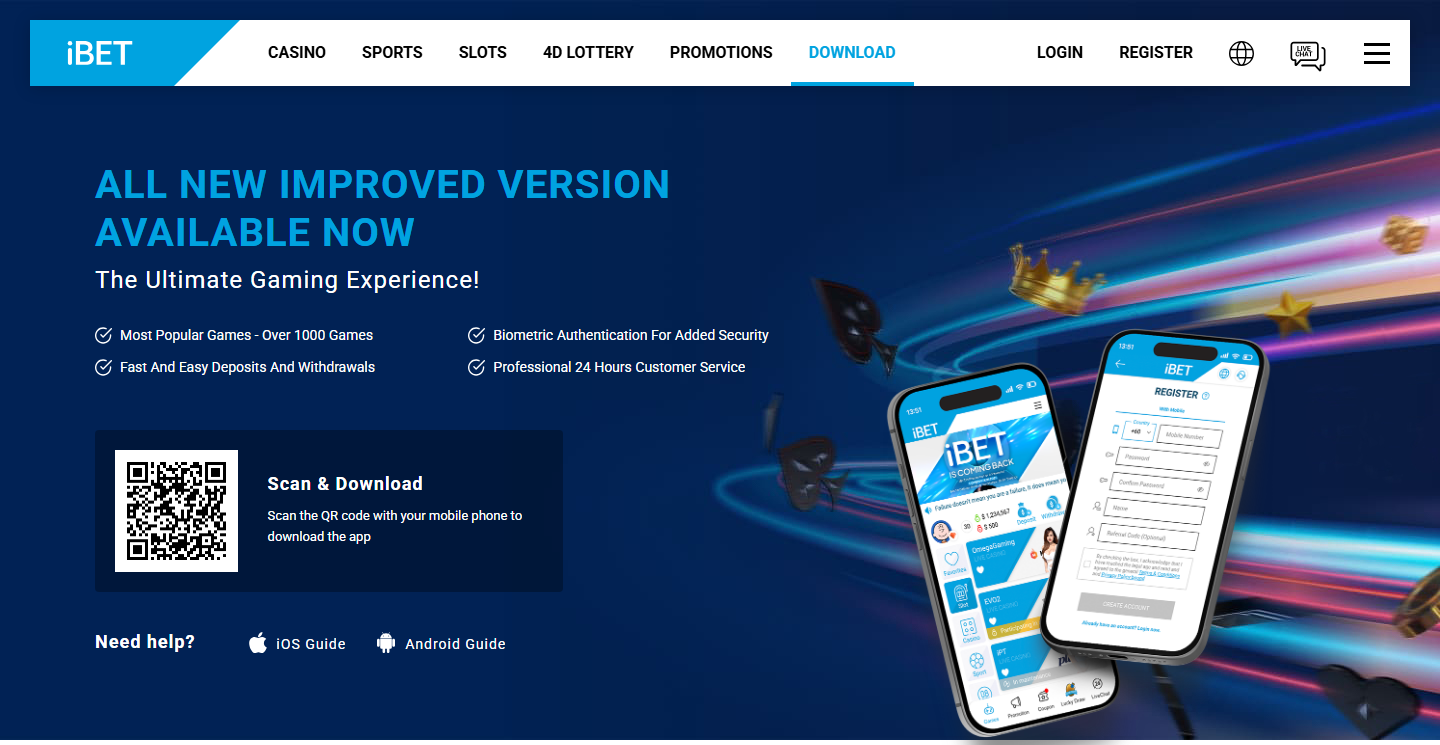
Whichever phone you have, the file comes from the same place. Open the iBET download page, find the “Scan & Download” panel and scan the QR code with your phone camera. If you are already browsing on the phone itself, the same panel offers a direct download instead.
The “Need help?” row underneath that panel links to the official iOS and Android walkthroughs, which is the same destination as the two sections below.
iPhone and iPad: the installation finishes inside Settings
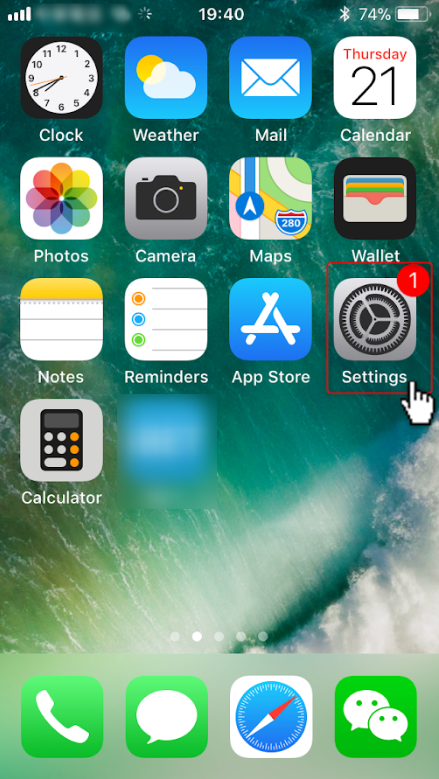
Apple does not accept real-money gambling apps for this market, so the iOS build is distributed as an enterprise application rather than through the App Store. That is normal for the category, and it has one consequence worth knowing before you start: after the download, iOS will not run the app until you have trusted the developer profile.
The walkthrough takes seven steps — scan the QR code, open Settings, go to General, open Device Management, tap the profile under “ENTERPRISE APP”, tap Trust, then confirm. You only do it once per device. Skip the trust step and the app installs but refuses to open, which is the single most common reason people think the download failed.
Full walkthrough with screenshots: iBET iOS app download guide.
Android: an APK and one permission prompt
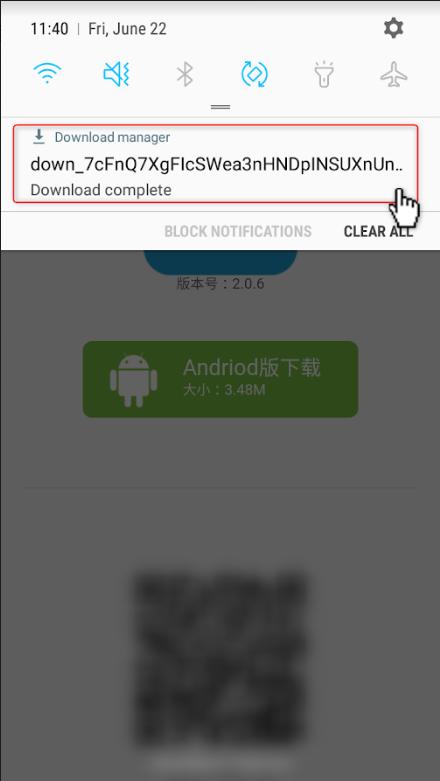
Google does not accept these apps either, so the Android build is downloaded straight from the iBET site as an APK file of around 3.5 MB. There is no developer-trust step here. Instead, Android stops the installation once to ask permission, because the file did not come from the Play Store.
The walkthrough takes six steps — scan the QR code, open the completed download from the notification shade, tap SETTINGS on the security prompt, switch on “Unknown sources” under Lock screen and security, tap INSTALL, then open the app. As with iOS, every one of these is a first-install-only step.
Full walkthrough with screenshots: iBET Android APK download guide.
Not sure which one you need?
If your phone is an iPhone or an iPad, use the iOS guide. If it is a Samsung, Xiaomi, Oppo, Vivo, Huawei, Realme or any other non-Apple handset, use the Android guide. There is no separate build for tablets beyond those two.
A quick sanity check: if the installation ends with a prompt about “Unknown sources”, you are on Android. If it ends with you tapping “Trust” inside Settings, you are on iOS.
After the install: how you sign in
Both guides end at the same place. Open the app or the mobile site, tap LOGIN in the top bar, and choose between two methods: “with Password”, which takes your username, registered mobile number or email plus your password, and “with SMS”, which sends a one-time code to your registered number instead. The SMS option is the safer choice on a shared or borrowed device.
One correction worth stating plainly, because older guides still say otherwise: the current app does not use fingerprint or Face ID. The iBET GO app that carried those toggles has been retired. Password or SMS code is the whole list.
Frequently asked questions
Why is the iBET app not on the App Store or Play Store?
Neither store accepts real-money gambling apps for this market, so the app is distributed from the iBET site — as an enterprise build on iOS and as an APK on Android.
Is installing from outside the stores safe?
It is safe when the file comes from the official download page. Scan the QR code on ibetmyr88.com/download.html rather than taking an APK from a forum or a messaging group.
The app installed but will not open. What went wrong?
On iOS, the trust step was skipped or half-completed — go back to Settings > General > Device Management and check the profile shows as verified. On Android, the download usually did not finish; check the file size and download again.
Do I have to do this every time the app updates?
No. The trust step on iOS and the Unknown sources prompt on Android are first-install steps for the device.
Does the app use fingerprint or face recognition?
No. You sign in with a password or a one-time SMS code. The older iBET GO app that offered biometric login is no longer available.
Can I use the mobile site instead of installing anything?
Yes. The mobile site carries the same login screens and the same products; the app is simply faster and keeps you signed in.
iBET App Download: Pick the Right Guide for Your Phone
The iBET app puts live casino, sports betting, slots and 4D on one account, and the download itself takes seconds. What trips people up is the step after the download, and that step is different depending on the phone you hold.
That is why there are two separate guides rather than one. This page explains the difference in plain terms, shows you where the download starts, and sends you to the walkthrough that matches your device.
Start in the same place either way: the download page
Whichever phone you have, the file comes from the same place. Open the iBET download page, find the “Scan & Download” panel and scan the QR code with your phone camera. If you are already browsing on the phone itself, the same panel offers a direct download instead.
The “Need help?” row underneath that panel links to the official iOS and Android walkthroughs, which is the same destination as the two sections below.
iPhone and iPad: the installation finishes inside Settings
Apple does not accept real-money gambling apps for this market, so the iOS build is distributed as an enterprise application rather than through the App Store. That is normal for the category, and it has one consequence worth knowing before you start: after the download, iOS will not run the app until you have trusted the developer profile.
The walkthrough takes seven steps — scan the QR code, open Settings, go to General, open Device Management, tap the profile under “ENTERPRISE APP”, tap Trust, then confirm. You only do it once per device. Skip the trust step and the app installs but refuses to open, which is the single most common reason people think the download failed.
Full walkthrough with screenshots: iBET iOS app download guide.
Android: an APK and one permission prompt
Google does not accept these apps either, so the Android build is downloaded straight from the iBET site as an APK file of around 3.5 MB. There is no developer-trust step here. Instead, Android stops the installation once to ask permission, because the file did not come from the Play Store.
The walkthrough takes six steps — scan the QR code, open the completed download from the notification shade, tap SETTINGS on the security prompt, switch on “Unknown sources” under Lock screen and security, tap INSTALL, then open the app. As with iOS, every one of these is a first-install-only step.
Full walkthrough with screenshots: iBET Android APK download guide.
Not sure which one you need?
If your phone is an iPhone or an iPad, use the iOS guide. If it is a Samsung, Xiaomi, Oppo, Vivo, Huawei, Realme or any other non-Apple handset, use the Android guide. There is no separate build for tablets beyond those two.
A quick sanity check: if the installation ends with a prompt about “Unknown sources”, you are on Android. If it ends with you tapping “Trust” inside Settings, you are on iOS.
After the install: how you sign in
Both guides end at the same place. Open the app or the mobile site, tap LOGIN in the top bar, and choose between two methods: “with Password”, which takes your username, registered mobile number or email plus your password, and “with SMS”, which sends a one-time code to your registered number instead. The SMS option is the safer choice on a shared or borrowed device.
One correction worth stating plainly, because older guides still say otherwise: the current app does not use fingerprint or Face ID. The iBET GO app that carried those toggles has been retired. Password or SMS code is the whole list.
Frequently asked questions
Why is the iBET app not on the App Store or Play Store?
Neither store accepts real-money gambling apps for this market, so the app is distributed from the iBET site — as an enterprise build on iOS and as an APK on Android.
Is installing from outside the stores safe?
It is safe when the file comes from the official download page. Scan the QR code on ibetmyr88.com/download.html rather than taking an APK from a forum or a messaging group.
The app installed but will not open. What went wrong?
On iOS, the trust step was skipped or half-completed — go back to Settings > General > Device Management and check the profile shows as verified. On Android, the download usually did not finish; check the file size and download again.
Do I have to do this every time the app updates?
No. The trust step on iOS and the Unknown sources prompt on Android are first-install steps for the device.
Does the app use fingerprint or face recognition?
No. You sign in with a password or a one-time SMS code. The older iBET GO app that offered biometric login is no longer available.
Can I use the mobile site instead of installing anything?
Yes. The mobile site carries the same login screens and the same products; the app is simply faster and keeps you signed in.